Showing posts with label Algorithm. Show all posts

Sunday, 12 October 2014

Binary Search Tree in Scala

In this post we are going to make a structure which is similar to Binary Search Tree (BST).

Each node contains an integer element and two child nodes. All the nodes having value less than the current node will be on the left and all nodes having value greater will be on right. If a node doesn't have any child then it will have empty node at that place.

From the description, we can deduce that there are two types on integer nodes - Empty and Non Empty. The operations can be to add a new node or to check if a node exists in the current tree. Hence lets define an abstract class IntNode with these two abstract functions.

IntNode.scala
abstract class IntNode {
  def incl(x: Int): IntNode
  def contains(x: Int): Boolean
}

This abstract class will have its first concrete implementation as Empty node. This is empty node, hence its contains function will always return false. The incl function will take an integer value and create a non-empty node. The code is as follows.

Empty.scala
class Empty extends IntNode {
  def incl(x: Int): IntNode = new NonEmpty(x, new Empty, new Empty)
  def contains(x: Int): Boolean = false
  override def toString = " . "
}

Another concrete implementation of IntNode is NonEmpty node which is as follows.

NonEmpty.scala
class NonEmpty(elem: Int, left: IntNode, right: IntNode) extends IntNode {

  def incl(x: Int): IntNode =
    if (x < elem)
      new NonEmpty(elem, left incl x, right)
    else if (x > elem)
      new NonEmpty(elem, left, right incl x)
    else
      this

  def contains(x: Int): Boolean =
    if (x < elem)
      left contains x
    else if (x > elem)
      right contains x
    else
      true

  override def toString = " { " + left + elem + right + " } "
}

The toString function is overridden to print Empty node as dot(.) and non-empty node in the order of left, element and then right node(s).

Let's first take the contains function. It compares the element x passed to it with current node element and takes a decision based on the BST property. If an element doesn't exists in the tree then it recursively reaches the Empty node of which the contains function returns false.

The incl function also uses the property of BST to add a new node. If the element already present in the list, then it avoids duplication by returning this reference. Otherwise it accordingly reconstruct the tree.

The sample Main class and its output are as follows.

Main.scala
object Main extends App {

  val t1 = new Empty
  println("t1 = " + t1)

  val t2 = t1 incl 4
  println("t2 = " + t2)

  val t3 = t2 incl 1
  println("t3 = " + t3)

  val t4 = t3 incl 5
  println("t4 = " + t4)

  val t5 = t4 incl 2 incl 7 incl 0
  println("t5 = " + t5)

  println("t1 contains 4 = " + (t1 contains 4))
  println("t2 contains 4 = " + (t2 contains 4))
  println("t5 contains 4 = " + (t5 contains 4))
  println("t5 contains 0 = " + (t5 contains 0))
  println("t5 contains 9 = " + (t5 contains 9))

  val t6 = t5 incl 1
  println("t6 = " + t6)

}

Output
t1 =  . 
t2 =  {  . 4 .  } 
t3 =  {  {  . 1 .  } 4 .  } 
t4 =  {  {  . 1 .  } 4 {  . 5 .  }  } 
t5 =  {  {  {  . 0 .  } 1 {  . 2 .  }  } 4 {  . 5 {  . 7 .  }  }  } 
t1 contains 4 = false
t2 contains 4 = true
t5 contains 4 = true
t5 contains 0 = true
t5 contains 9 = false
t6 =  {  {  {  . 0 .  } 1 {  . 2 .  }  } 4 {  . 5 {  . 7 .  }  }  } 

Friday, 3 October 2014

Scala program for Counting change for a given amount and denominations

Problem Statement
Write a recursive function that counts how many different ways you can make change for an amount, given a list of coin denominations. For example, there are 3 ways to give change for 4 if you have coins with denomiation 1 and 2: 1+1+1+1, 1+1+2, 2+2.

How to think
First of all, sort the denomination set in ascending order.

Thumb Rule = Let a is the amount for which you have to find all the possible ways from a given denominations set S. Then the number of possible ways amount a can be achieved is equal to
  • number of ways the amount a-Smax can be achieved using S +
  • number of ways a can be achieved using S' = S - Smax i.e. removing the max element from S
Apart from the implementation of thumb rule, check that
  1. if amount is negative, then we have crossed the limit and no way possible, so return 0
  2. if amount is equal to 0, then the change has achieved through this branch, hence return 1
  3. if max index is out of bound, then return 0
Program
Following function takes the amount and denomination's set, and returns the count of number of possible ways of getting change for the amount.
def countChange(money: Int, coins: List[Int]): Int = {

    val sortedCoins = coins.sorted

    def getCount(amount: Int, maxIndex: Int): Int = {

      if (amount < 0) 0
      else if (amount == 0) 1
      else if (maxIndex < 0) 0
      else getCount(amount - sortedCoins(maxIndex), maxIndex) + getCount(amount, maxIndex - 1)
    }

    getCount(money, coins.size - 1)
  }

Pascal's Triangle in Scala

To understand the recursive logic of Pascal's triangle, draw a sample triangle as follows.

r,c
0
1
2
3
4
5
6
0
1


1
1
1


2
1
2
1


3
1
3
3
1


4
1
4
6
4
1


5
1
5
10
10
5
1

6
1
6
15
20
15
6
1

Now, pick a a column(c) and row(r) value. You will find that,
(c,r) = (c-1,r-1)+(c,r-1)

The program in Scala is as follows.

Program
object Main {
  def main(args: Array[String]) {
    println("Pascal's Triangle")
    for (row <- 0 to 10) {
      for (col <- 0 to row)
        print(pascal(col, row) + " ")
      println()
    }

  }

  def pascal(c: Int, r: Int): Int = {
    if (c == 0 || c == r) 1
    else
      pascal(c - 1, r - 1) + pascal(c, r - 1)
  }

Output
Pascal's Triangle
1 
1 1 
1 2 1 
1 3 3 1 
1 4 6 4 1 
1 5 10 10 5 1 
1 6 15 20 15 6 1 
1 7 21 35 35 21 7 1 
1 8 28 56 70 56 28 8 1 
1 9 36 84 126 126 84 36 9 1 
1 10 45 120 210 252 210 120 45 10 1

Saturday, 26 May 2012

Building a Binary Tree using Inorder and Postorder Traversals in Java

class TNode
{
 int data;
 TNode left;
 TNode right;

 TNode(int d)
 {
  data = d;
  left= null;
  right=null;
 }
}

class TreeBuilder
{
 static int postIndex;
 static int[] in, post;
 TNode Start;

 static void setValue(int[] i, int[] p)
 {
  in = i;
  post = p;
  postIndex=in.length-1; //Change 1
 }

 static int findInIndex(int inStart, int inEnd, int value)
 {
  for(int i=inStart; i<=inEnd; i++)
   if(in[i]==value)
   return i;

  return -1;
 }

 //Main method with the logic for building tree using Pre and Inorder traversals
 static TNode buildTree(int inStart, int inEnd)
 {
  if(inStart>inEnd)
   return null;

  TNode node = new TNode(post[postIndex--]); //Change 2

  if(inStart==inEnd)
   return node;

  int inIndex = findInIndex(inStart, inEnd, node.data);
  
  //Change 3

  node.right=buildTree(inIndex+1, inEnd);
  node.left=buildTree(inStart, inIndex-1);

  return node;
 }
}

class TreeBuilderDemo 
{
 public static void main(String[] args) 
 {
  int[] in = {8, 4, 10, 9, 11, 2, 5, 1, 6, 3, 7};
  int[] post = {8, 10, 11, 9, 4, 5, 2, 6, 7, 3, 1};

  TreeBuilder.setValue(in, post);

  TNode start = TreeBuilder.buildTree(0,in.length-1);

  System.out.print("\nPreorder\t: ");
  printPreorder(start);

  System.out.print("\n\nInorder\t\t: ");
  printInorder(start);

  System.out.print("\n\nPostorder\t: ");
  printPostorder(start);

  System.out.println("");
 }

 static void printInorder(TNode node)
 {
  if (node == null)
   return; 

  printInorder(node.left);   
  System.out.print(node.data + "\t "); 
  printInorder(node.right);   
 }

 static void printPreorder(TNode node)
 {
  if (node == null)
   return; 

  System.out.print(node.data + "\t ");
  printPreorder(node.left);   
  printPreorder(node.right);   
 }

 static void printPostorder(TNode node)
 {
  if (node == null)
   return; 

  printPostorder(node.left);   
  printPostorder(node.right);   
  System.out.print(node.data + "\t ");
 }
}

Click here to learn Building a Binary Tree using Inorder and Preorder Traversals in Java.

Wednesday, 23 May 2012

Cards Arrangement Program in Java

Aim

Write a program to print the source sequence of cards, for one card below the deck & every alternate card opened & discarded ?

Code
import java.io.*;

class OutSequenceException extends Exception
{
 public String toString()
 {
  return "OutSequenceException: Invalid Number Entered !\nProgram Terminating....";
 }
}

class Card
{
 public static void main(String[] args)
 {
  try
  {

   BufferedReader br = new BufferedReader(new InputStreamReader(System.in));
   
   //Array to store inputs and sorted sequence
   int[] a = new int[60];
   int[] b = new int[60];

   boolean flag=false;
 
   int count=0, index=0, skips, n;

   System.out.print("Enter Limit (13,26,39,52) :");
   n = Integer.parseInt(br.readLine());

   if(n!=13 && n!=26 && n!=39 && n!=52)
    throw new OutSequenceException();
    

   System.out.println("Provide Inputs");
   
   for(int i=0; i<n; i++)
   {
    a[i]=Integer.parseInt(br.readLine());

    if(a[i]>n)
     throw new OutSequenceException();

   }

   System.out.print("Enter number of skips: ");
   skips = Integer.parseInt(br.readLine());
   

   for(int i=0; i<n; i++)
   {
    //if flag is true means skips are done and b[i]=0 so no element placed there
    if(flag  && b[i]==0)
    {
     b[i]=a[count];
     count++;//next card to be placed
     flag=false;
    }


    /* 
       if previous if not executed because flag=false but some element 
       is there then also this will not execute hence skip will not 
       be incremented rather i will increase and next position 
       will be checked 
    */

    if(b[i]==0) //means previous if is not executed and no element is placed there
    {
     index++; 
     if(index==skips)
     {
      flag=true;
      index=0;
     }
     else
      flag=false;
    }

    //Reset the loop
    if(i==(n-1))
     i=-1;

    //Exit
    if(count==n)
     break;    
    
   }   
 
   //Finally print the result
   for(int i=0; i<n; i++)
    System.out.println(b[i]);

  }
  catch(Exception e)
  {
   System.out.println(e);
  }  
 }
}

Binary Search Tree in C Data Structure

In computer science, a binary search tree (BST) is a node based binary tree data structure which has the following properties:
  • The left subtree of a node contains only nodes with keys less than the node's key.
  • The right subtree of a node contains only nodes with keys greater than the node's key.
  • Both the left and right subtrees must also be binary search trees.
From the above properties it naturally follows that: Each node (item in the tree) has a distinct key.

Generally, the information represented by each node is a record rather than a single data element. However, for sequencing purposes, nodes are compared according to their keys rather than any part of their their associated records.

The major advantage of binary search trees over other data structures is that the related sorting algorithms and search algorithms such as in-order traversal can be very efficient.
Binary search trees are a fundamental data structure used to construct more abstract data structures such as sets, multisets, and associative arrays.
A binary search tree of size 9 and depth 3, with root 8 and leaves 1, 4, 7 and 13 

#include<stdio.h>
#include<conio.h>
#define null 0

struct t
{
 int data;
 struct t *left;
 struct t *right;
};

typedef struct t tree;
tree *ptr, *root, *q;

void inorder(tree *ptr); //left - root - right
void preorder(tree *ptr); //root - left - right
void postorder(tree *ptr); //left - right - root

void main()
{
 int val;
 char c='n';
 root = (tree *)malloc(sizeof(tree));

 clrscr();

 printf("Enter data: ");
 scanf("%d",&root->data);
 root->left=null;
 root->right=null;
 ptr=root; //set the current pointer to root

 fflush(stdin);
 printf("\nDo you want to add more nodes? (y/n)");
 c=getche();

 while(c!='n')
 {
  printf("\nEnter data: ");
  scanf("%d",&val);
  ptr=root;   //Every time start from root and traverse
  while(1)
  {
   if(val<ptr->data)
   {
    if(ptr->left==null)
    {
     q=(tree *) malloc(sizeof(tree));
     ptr->left=q;
     ptr=ptr->left;
     ptr->data=val;
     ptr->left=null;
     ptr->right=null;
     break;
    }
    else
     ptr=ptr->left;
   }
   else
   {
    if(ptr->right==null)
    {
     q=(tree *) malloc(sizeof(tree));
     ptr->right=q;
     ptr=ptr->right;
     ptr->data=val;
     ptr->left=null;
     ptr->right=null;
     break;
    }
    else
     ptr=ptr->right;
   }
  }

  printf("\nDo you want to add more nodes? (y/n)");
  c=getche();
 }

 printf("\n\n\n\n\nInorder:\n");
 inorder(root);

 printf("\n\nPreorder:\n");
 preorder(root);

 printf("\n\nPostorder:\n");
 postorder(root);

 getch();
}

void inorder(tree *ptr)
{
 //left - root - right
 if(ptr!=null)
 {
  inorder(ptr->left);
  printf("%d\t",ptr->data);
  inorder(ptr->right);
 }
}

void preorder(tree *ptr)
{
 //root - left - right
 if(ptr!=null)
 {
  printf("%d\t",ptr->data);
  inorder(ptr->left);
  inorder(ptr->right);
 }
}

void postorder(tree *ptr)
{
 //left - right - root
 if(ptr!=null)
 {
  inorder(ptr->left);
  inorder(ptr->right);
  printf("%d\t",ptr->data);
 }
}

Linked List in C Programming

#include<stdio.h>
#include<conio.h>
#define null 0

//structure of a node
struct n
{
 int data;        //data to store
 struct n *next;  //pointer to next node
};

typedef struct n node;
node *first, *p, *last;

void create(node*, int);
void display(node*, int);
void sort(node*);
int search(node*, int, int);
void Delete(node *,int);

void main()
{
 int count,d;

 clrscr();

 printf("Enter number of nodes: ");
 scanf("%d",&count);

 //creating nodes
 if(count>0)
 {
  first = (node *)malloc(sizeof(node));
  printf("Enter Data : ");
  scanf("%d",&first->data);
  first->next=null;

  count--;

  create(first,count);
 }

 printf("Displaying node contents -- \n\n\n");
 display(first,1);

 //sort operation on linked list
 sort(first);
 printf("\n\n\nAfter Sorting: \n\n");
 display(first,1);

 //search position of specified data
 printf("\n\n\nEnter data to search : ");
 scanf("%d",&d);

 count = search(first,d,1);

 if(count!=-1)
 {
     printf("Data found at %d.",count);
 }
 else
  printf("Data not found");

 //Add more nodes
 printf("\n\n\nEnter more number of nodes to add: ");
 scanf("%d",&count);

 create(last,count);
 sort(first);

 printf("\n\n\nFinal node values:");
 display(first,1);

 //Deleting a node
 printf("\n\nEnter data to delete: ");
 scanf("%d",&d);

 Delete(first,d);

 printf("\n\nAfter deletion nodes:\n ");
 display(first,1);

 getch();
}

void create(node *p,int count)
{
 if(count>0)
 {
  p->next =  (node *)malloc(sizeof(node));
  last=p=p->next;

  printf("Enter Data: ");
  scanf("%d",&p->data);
  p->next = null;

  count--;
  create(p,count);
 }
 else
  return;
}

void display(node *p, int count)
{
     if(p!=null)
     {
 printf("\nNode %d: %d",count,p->data);
 count++;
 display(p->next,count);
     }
     else
 return;
}

int search(node *p,int data, int count)
{
 if(p!=null)
 {
  if(data==p->data)
   return count;
  else
  {
   count++;
   search(p->next,data,count);
  }
 }
 else
  return -1;  //no matching node found
}

void Delete(node *p,int data)
{
 int count = search(first,data,1);

 if(count<0)
  printf("Data not found.");
 else
 {       p=first;
  count--;

  if(count==0)
   first=first->next;
  else
  {
   while(count>1)
   {
      p=p->next;
      count--;
   }

   p->next=p->next->next;
  }
 }
}

void sort(node *p)
{
 while(p!=null)
 {
  node *q = p->next;

  while(q!=null)
  {
   if(q->data<p->data)
   {
    int temp;
    temp=p->data;
    p->data=q->data;
    q->data=temp;
   }

   q=q->next;
  }
  p=p->next;
 }
}

Sunday, 13 May 2012

Building a Binary Tree using Inorder and Preorder Traversals in Java

This is a well known problem where given any two traversals of a tree  such as inorder & preorder or inorder & postorder traversals we need to rebuild the tree.

The following algorithm demonstrates how to rebuild a binary tree from given inorder and preorder traversals:

Global Declarations
preIndex=0;
Structure tNode
{
int data;
tNode left=null;
tNode right=null;
}

Main
1. Set Inorder and Preorder traversals
2. startNode = buildTree(0, in.length-1)
3. printPreorder(startNode)
4. printInorder(startNode)
5. printPostorder(startNode)
6. Stop

buildTree(inStart, inEnd)
1. If (inStart>inEnd)
return NULL
   End If
2. Create a new tree node tNode with tNode.data = preorder[preIndex].
3. Increment a preIndex Variable to pick next element in next recursive call.
4. If(inStart == inEnd)
return tNode
   End If
5. Find the picked element’s index in Inorder. Let the index be inIndex.
6. tNode.left = buildTree (inStart, inIndex-1)
7. tNode.right = buildTree ( inIndex+1, inEnd)
8. return tNode.


Now consider the following example:

Preorder Traversal:    1    2    4    8    9    10    11    5    3    6    7
Inorder Traversal:       8    4    10    9    11    2    5    1    6    3    7

Iteration 1:

In a Preorder sequence, leftmost element is the root of the tree. So we know ‘1’ is root for given sequences. By searching ‘1’ in Inorder sequence, we can find out all elements on left side of ‘1’ are in left subtree and elements on right are in right subtree. So we know below structure now.

Root – {1}
Left Subtree – {8,4,10,9,11,2,5}
Right Subtree – {6,3,7}


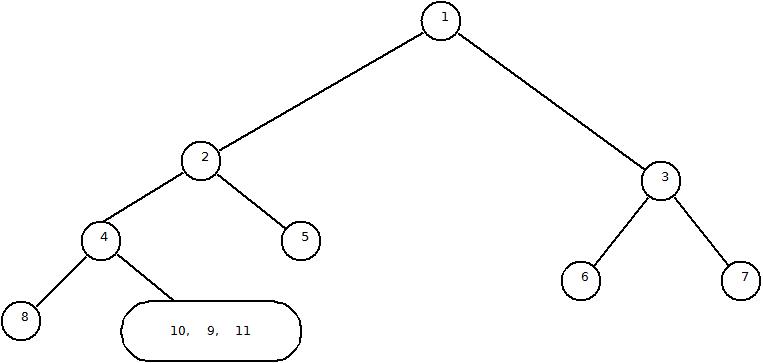
We recursively follow above steps and get the following tree.


Iteration 2:
Root – {2}
Left Subtree – {8,4,10,9,11}
Right Subtree – {5}
Root – {3}
Left Subtree – {6}
Right Subtree – {7}


Iteration 3:
Root – {2}
Left Subtree – {8,4,10,9,11}
Right Subtree – {5}
Root – {3}
Left Subtree – {6}
Right Subtree – {7}
Root – {4}
Left Subtree – {8}
Right Subtree – {10,9,11}
DoneDone


Iteration 4:
Root – {2}
Left Subtree – {8,4,10,9,11}
Right Subtree – {5}
Root – {3}
Left Subtree – {6}
Right Subtree – {7}
Root – {4}
Left Subtree – {8}
Right Subtree – {10,9,11}
Done
Done
Done
R – {9}
Left ST – {10}
Right ST-{11}
Done
Done


Finally a program in Java to demonstrate this tree building using traversal paths.


class TNode
{
 int data;
 TNode left;
 TNode right;

 TNode(int d)
 {
  data = d;
  left= null;
  right=null;
 }
}

class TreeBuilder
{
 static int preIndex;
 static int[] in, pre;
 TNode Start;

 static void setValue(int[] i, int[] p)
 {
  in = i;
  pre = p;
  preIndex=0;
 }

 static int findInIndex(int inStart, int inEnd, int value)
 {
  for(int i=inStart; i<=inEnd; i++)
   if(in[i]==value)
   return i;

  return -1;
 }


 //Main method with the logic for building tree using Pre and Inorder traversals
 static TNode buildTree(int inStart, int inEnd)
 {
  if(inStart>inEnd)
   return null;

  TNode node = new TNode(pre[preIndex++]);

  if(inStart==inEnd)
   return node;

  int inIndex = findInIndex(inStart, inEnd, node.data);

  node.left=buildTree(inStart, inIndex-1);
  node.right=buildTree(inIndex+1, inEnd);

  return node;
 }
}

class TreeBuilderDemo 
{
 public static void main(String[] args) 
 {
  int[] in = {8, 4, 10, 9, 11, 2, 5, 1, 6, 3, 7};
  int[] pre = {1, 2, 4, 8, 9, 10, 11, 5, 3, 6, 7};

  TreeBuilder.setValue(in, pre);

  TNode start = TreeBuilder.buildTree(0,in.length-1);


  //Now we will traverse through the newly created tree to verify that it is proper
  System.out.print("\nPreorder\t: ");
  printPreorder(start);

  System.out.print("\n\nInorder\t\t: ");
  printInorder(start);

  System.out.print("\n\nPostorder\t: ");
  printPostorder(start);

  System.out.println("");
 }

 static void printInorder(TNode node)
 {
  if (node == null)
   return; 

  printInorder(node.left);   
  System.out.print(node.data + "\t "); 
  printInorder(node.right);   
 }

 static void printPreorder(TNode node)
 {
  if (node == null)
   return; 

  System.out.print(node.data + "\t ");
  printPreorder(node.left);    
  printPreorder(node.right);   
 }

 static void printPostorder(TNode node)
 {
  if (node == null)
   return; 

  printPostorder(node.left);   
   printPostorder(node.right);   
  System.out.print(node.data + "\t ");
 }
}

Output of the program

Thursday, 3 May 2012

File Sorting - 2 Source 2 Destination


The problem with 2S - 1D is the explicit run distribution that occurs after each merge. It doubles the pressure on the disk queue. We can reduce this pressure drastically by allocating one more frame and designing the file sorting algorithm for 2 sources and 2 destinations (2S - 2D).

There will be four files F1, F2, F3 and F4. We have marked and distributed runs in F1 and F2. 

First take F1 & F2 as sources S1, S2 and F3 & F4 as destinations D1, D2 respectively. Take a run from S1 and a run from S2. Merge and place in D1 then switch the destination to D2. Take another run from S1 and S2, merge and place in D2. Again switch the destination. If end of file is encountered in S1 and S2 then D1 and D2 will become new sources and S1 and S2 will become new destination files. Hence the data movement will be from source to destination. Which pair of files will be source and which pair will be destination, will keep on changing as per time. 

At the end there will be one run on S1 and one run on S2. Merge and write on D1. As no data to write on D2, hence all the data is sorted.

The algorithm for the sub procedure for merging 2S-2D is as follows.
MergeRuns(boolean flag)
1. runCount=0;
2. if(flag==true)
 s1 = Reset(F1)
 s2 = Reset(F2)
 d1 = Rewrite(F3)
 d2 = Rewrite(F4)
   Else
 s1 = Reset(F3)
 s2 = Reset(F4)
 d1 = Rewrite(F1)
 d2 = Rewrite(F2)
   End if
3. e1 = Read(s1)
4. e2 = Read(s2)
5. d = d1;
6. While ( e1 != eof  and e2 !=eof)
 While (e1 != eor and e2 !=eor)
  If(e1<e2)
   Write(d, e1)
   e1 = Read(s1)
  Else
   Write(d, e2)
   e2 = Read(s2)
  End if
 End While

 If (e1 == eor)
  Copy remaining elements of the run from s2
 Else if (e2 == eor)
  Copy remaining elements of the run from s1
 End if
 Mark eor in d
 runCount++;
 
 If (d==d1)
  d=d2
 Else
  d=d1
 End if
   End While
7. If(e1==eof)
 While (e2 != eof)
  Write(e2,d)
  If(e2==eor) runCount++;
  Read(e2,s2)
 End While
   Else if(e2==eof)
 While (e1 != eof)
  Write(e1,d)
  If(e1==eor) runCount++;
  Read(e1,s1)
 End While
   End if
8. Mark EOF in d1
9. Mark EOF in d2
10.Return runCount


A program in C to sort file using 2S - 2D technique.

#include<stdio.h>
#include<conio.h>
#include<stdlib.h>

#define eor -1
#define eof -2

FILE *f1, *f2, *d1, *d2;

markRunsAndDistribute();
mergeRuns(int);


void main()
{
 int flag=0;
 markRunsAndDistribute();

 while(mergeRuns(flag)!=1)
  flag=1-flag;

 printf("File Sorted....");
}

markRunsAndDistribute()
{
 int runCount=0;
 int current, next;
 int switchFlag=1;


 if( (d1 = fopen("Source.txt", "r")) == NULL)
 {
  printf("Source file not found.");
  exit(1);
 }

 f1 = fopen("File1.txt","w");
 f2 = fopen("File2.txt", "w");

 fscanf(d1,"%d",¤t);

 while(1)
 {
  fscanf(d1, "%d", &next);

  if(next==eof)
  {
   if(switchFlag==1)
   {       fprintf(f1, "%d %d %d",current,eor,eof);
    fprintf(f2, "%d",eof);
    runCount++;
    break;
   }
   else
   {
    fprintf(f2, "%d %d %d",current,eor,eof);
    fprintf(f1, "%d",eof);
    runCount++;
    break;
   }
  }
  else
  {
   if(current>next)
   {
    if(switchFlag==1)
    {
     fprintf(f1, "%d %d ", current, eor);
     runCount++;
     switchFlag=2;
    }
    else
    {
     fprintf(f2, "%d %d ", current, eor);
     runCount++;
     switchFlag=1;
    }
   }
   else
   {
    if(switchFlag==1)
    {
        fprintf(f1, "%d ", current);
    }
    else
    {
        fprintf(f2, "%d ", current);
    }

   }
  }
  current = next;
 }

 fclose(d1);
 fclose(f1);
 fclose(f2);

 return runCount;
}

mergeRuns(int group)
{
 int switchD=0;
 int runCount=0;
 FILE *d;

 int e1, e2;

 if(group==0)
 {
  f1 = fopen("File1.txt","r");
  f2 = fopen("File2.txt","r");
  d1 = fopen("File3.txt","w");
  d2 = fopen("File4.txt","w");
 }
 else
 {
  f1 = fopen("File3.txt","r");
  f2 = fopen("File4.txt","r");
  d1 = fopen("File1.txt","w");
  d2 = fopen("File2.txt","w");
 }

 
 fscanf(f1,"%d",&e1);
 fscanf(f2,"%d",&e2);

 d=d1;

 while (e1!=eof && e2!=eof)
 {
  while(e1!=eor && e2!=eor)
  {
   if(e1<e2)
   {
    fprintf(d,"%d ",e1);
    fscanf(f1,"%d",&e1);
   }
   else
   {
    fprintf(d,"%d ",e2);
    fscanf(f2,"%d",&e2);
   }
  }

  if(e1==eor)
  {
   while (e2!=eor)
   {
    fprintf(d, "%d ", e2);
    fscanf(f2, "%d", &e2);
   }
  }
  else if(e2==eor)
  {
   while (e1!=eor)
   {
    fprintf(d, "%d ", e1);
    fscanf(f1, "%d", &e1);
   }
  }

  fprintf(d, "%d ", eor);
  runCount++;

  if(d==d1)
   d=d2;
  else
   d=d1;

  fscanf(f1,"%d",&e1);
  fscanf(f2,"%d",&e2);
  
 }
 if(e1==eof)
 {
  while (e2!=eof)
  {
   fprintf(d, "%d ", e2);
   if(e2==eor) runCount++;
   fscanf(f2, "%d", &e2);
  }
 }
 else if(e2==eof)
 {
  while (e1!=eof)
  {
   fprintf(d, "%d ", e1);
   if(e1==eor) runCount++;
   fscanf(f1, "%d", &e1);
  }
 }

 fprintf(d1,"%d",eof);
 fprintf(d2,"%d",eof);
 

 fclose(f1);
 fclose(f2);
 fclose(d1);
 fclose(d2);

 return runCount;
}

Advantage of 2S - 2D

Consider a file with 1K record. To fetch (read and write) a record 1 disk access is required and to distribute the record in two files 1K disk access.


Approximately half the number of disk accesses are saved in 2S – 2D. Hence by giving one extra frame the pressure on the disk queue is reduced drastically.

File Sorting - 2 Source 1 Destination

Introduction
A file is a series of records. A record consists of one or more fields. One of the fields in the record is called as key field which is used to uniquely identify a record. E.g. A student’s record consists of Roll Number, Name, Class, Subjects, and Marks etc. fields; of this Roll Number is the key field as it is used to uniquely identify a student. One student is one instance with one record each. These instances are called series of records. Record in a file is synonym to tuple is the database. A record consists of field(s). Tuple is described with column(s).

While working with files, if the records are of fixed length with fixed number of fields in a fixed order then a structure can be defined to store the record. If records are of variable length then we use explicit delimiters to separate two records. The delimiter should be distinct and should not be used in the record. It is always predefined.

File Sorting
A file consists of millions of records. The size of a file is usually in GBs. To sort some data, all the data to be sorted must be visible (loaded in the RAM) at the time of sorting. As RAMs are in MBs hence the entire file cannot be loaded on the RAM. On a RAM only a small portion of the file is loaded in a frame. Each frame will hold a page of the file. The size of the page is defined by the register lines of the CPU.

Consider of the millions of records from a file, you are able to load only three records at a time in a frame. Hence at some point of time you can see only those records that can fit on a page depending on size of records fetched in RAM.

This is something which we need to adjust because in array sorting, you can see all elements but in files only a fraction is visible. Hence file sorting is different than arrays.

Why to sort a file?
  1. In database, we want to remove duplicate records.
  2. We are required to process some data in order. E.g. In a bank, highest depositors should be processed first.
  3. If there is a sort merge join.
While sorting, the things which are compared should be compatible. E.g. Comparison can be between roll numbers, date of births etc.

We will sort record on particular field where ordering exists and the rest (baggage) will not be considered. A record will be considered as consisting of Key & Baggage. If key is shifted then entire record including baggage will be shifted.

For us at this learning stage, a file consists of only keys which are to be sorted. To order keys, we need minimum 2 keys visible at a time. As only a page is loaded on a frame, we have a narrow window and can see only a couple of records; hence most of the file will be unsorted.

Two source files are must for any file sorting technique. Each file we talk about will be represented by a frame in the memory. We cannot open entire file in multiple frames as we have to work under the restriction of the operating system which are multitasking and many other processes also need RAM.

Minimum four frames are required for sorting (2 Source File + 1 Destination File + 1 Code File). If less than four frames then sorting is not possible.

The general steps for sorting a file are –
1. Start
2. Mark the runs in source file
3. Till number of runs != 1
       Distribute the runs in two or more files
       Merge the runs into a destination file
4. Stop
First we will open up discussion on how to mark runs.

Marking Runs


Note
reset(F0) -> Go to the beginning of the file and start reading.
rewrite(F0) -> Go to the beginning of the file and start writing.

1. Primitive Method

Consider a source file S with key values
76, 53, 5, 15, 20, 29, 31, 37, 41, 40, 50, 49, 91, 61, 81, 76, 1, 2, 3, 4, 5, 6
Now we will go through this file and mark runs. A run is a sorted subsequence of record.

1. Read 2 records
2. Sort those 2 records
3. Place them in F0
4. Mark eor (end of run)
5. Fetch Next two record and go to step 2
6. If no more records then stop

Now the file F0 will be
53, 76 | 5, 15 | 20, 29 | 31, 37| 40, 41| 49, 50| 61, 91| 76, 81| 1, 2| 3, 4| 5, 6|EOF 

But we have not taken advantage of the sortedness of the file hence this primitive method of marking run is not useful.

2. Marking Natural Runs

1. Reset(S)
2. Rewrite(F0)
3. Read record from S s.current
4. Place in F0
5. Read next record from S as s.next
6. If no record then go to step 8
7. If s.current<s.next Then
        Place s.next in F0
        Go to step 3
   Else
        Mark eor in F0
        Place s.next in F0
        Go to step 3
   End if
8. Mark eor in F0
9. Mark eof in F0
10.Stop

Now the file F0 will be
76 | 53 | 5, 15, 20, 29, 31, 37, 41 | 40, 50 | 49, 91 | 61, 81 | 76 | 1, 2, 3, 4, 5, 6 | EOF

<A procedure in C for marking natural runs>
markRuns()
{
 int runCount=0;
 int current, next;

 if( (d = fopen("Source.txt", "r")) == NULL)
 {
  printf("Source file not found.");
  exit(1);
 }

 f1 = fopen("File0.txt","w");

 fscanf(d,"%d",¤t);

 while(1)
 {
  fscanf(d, "%d", &next);

  if(next==eof)
  {
     fprintf(f1, "%d %d %d",current,eor,eof);
     runCount++;
     break;
  }
  else
  {
   if(current>next)
   {
    fprintf(f1, "%d %d ", current, eor);
    runCount++;
   }
   else
   {
    fprintf(f1, "%d ", current);
   }
  }

  current = next;
 }

 fclose(d);
 fclose(f1);
 fclose(f2);

 return runCount;
}


As the data is naturally sorted, hence these are called “Natural Runs”. The runs will be long, fewer and variable in length. This will have fewer passes. A pass is a run through entire data from 1st till last record.

Distributing Runs in two files F1 and F2
This is a very simple method. A flag is uses to switch between files F1 and F2.

1. Set flag=true
2. Reset(F0)
3. Rewrite(F1)
4. Rewrite(F2)
5. Read an element from F0
6. If element is EOF go to step 8
7. If flag is true
        Place the element in F1
        If the element is eor
           flag=false
   Else
        Place the element in F2
        If the element is eor
           flag=true
   End if
8. Mark EOF in F1 and F2
9. Stop

<A procedure in C for distributing runs>
void distributeRuns()
{
 int switchFlag=1;
 int e;

 f1 = fopen("File1.txt", "w");
 f2 = fopen("File2.txt", "w");
 d = fopen("File0.txt", "r");

 fscanf(d,"%d",&e);

 while (e!=eof)
 {
  if(switchFlag==1)
  {
   fprintf(f1, "%d ", e);
   if(e==eor) switchFlag=2;
  }
  else
  {
   fprintf(f2, "%d ", e);
   if(e==eor) switchFlag=1;
  }

  fscanf(d,"%d",&e);
 }

 fprintf(f1, "%d",eof);
 fprintf(f2, "%d",eof);

 fclose(d);
 fclose(f1);
 fclose(f2);
}


Now the contents of the files F1 and F2 will be as follows.

F1: 76 | 5, 15, 20, 29, 31, 37, 41 | 49, 91 | 76 | EOF
F2: 53 | 40, 50 | 61, 81 | 1, 2, 3, 4, 5, 6 | EOF

Mark and Distribute as one procedure
We have passed through the source file twice, 1st time to mark runs and 2nd time to distribute runs. These were explicit mark & distribute operations using two separate sub routines. This can be combined into one subroutine Mark & Distribute. The subroutine for primitive run marking and distribution is as follows. Flag is used to switch between files F1 and F2.
1. Reset(Source)
2. Rewrite(F1)
3. Rewrite(F2)
4. do
    Read frame full of data
    Sort internally using any array sorting algorithm
    If Flag=true
      Copy in F1
      Flag = flase
    Else
      Copy in F2
      Flag = true
    End if
    Mark eor
   Till you reach end of source
5. Stop

Algorithm of subroutine for marking and distributing natural runs is as follows. When we mark end of run, we switch the file and place element. This means that two things will be done at the same time. 1. Marking of runs and 2. Distribution of runs.

1. Reset(Source)
2. Rewrite(F1)
3. Rewrite(F2)
4. Flag=true
5. s.current = Read(source)
6. While (true)
     If(flag==true)
       f=F1;
     Else
       f=F2
     End if
     
     s.next = Read(source)

     If s.next==eof

       Write(s.current,f)
       Mark eor in f
       break

     Else

       If(s.current>s.next)
         Write(s.current, f)
         Mark(eor, f)
         flag=!(flag)
       Else
         Write(s.current, f)
       End if

     End if

     s.current=s.next
   End While
7. Write(F1, eof)
8. Write(F2, eof)
9. Stop

<A sub procedure in C for marking and distributing natural runs>

markRunsAndDistribute()
{
 int runCount=0;
 int current, next;
 int switchFlag=1;

 if( (d = fopen("File0.txt", "r")) == NULL)
 {
  printf("Source file not found.");
  exit(1);
 }

 f1 = fopen("File1.txt","w");
 f2 = fopen("File2.txt", "w");


 fscanf(d,"%d",¤t);

 while(1)
 {
  fscanf(d, "%d", &next);

  if(next==eof)
  {
   if(switchFlag==1)
   {       fprintf(f1, "%d %d %d",current,eor,eof);
    fprintf(f2, "%d",eof);
    runCount++;
    break;
   }
   else
   {
    fprintf(f2, "%d %d %d",current,eor,eof);
    fprintf(f1, "%d",eof);
    runCount++;
    break;
   }
  }
  else
  {
   if(current>next)
   {
    if(switchFlag==1)
    {
     fprintf(f1, "%d %d ", current, eor);
     runCount++;
     switchFlag=2;
    }
    else
    {
     fprintf(f2, "%d %d ", current, eor);
     runCount++;
     switchFlag=1;
    }
   }
   else
   {
    if(switchFlag==1)
    {
        fprintf(f1, "%d ", current);
    }
    else
    {
        fprintf(f2, "%d ", current);
    }

   }
  }

  current = next;
 }

 fclose(d);
 fclose(f1);
 fclose(f2);

 return runCount;
}

Merging Runs
After marking runs in the raw data and distributing it into two files, the next step is to merge them and put them back into a file. We pick an element from F1 and F2 each, place the smaller in F0 and advance in the file of which element is placed. If eor is encountered in a file, then copy the remaining elements from the run of the other file. E.g we are having files F1 and F2 as follows.

F1: 76 | 5, 15, 20, 29, 31, 37, 41 | 49, 91 | 76 | EOF
F2: 53 | 40, 50 | 61, 81 | 1, 2, 3, 4, 5, 6 | EOF

Compare 76 and 53; 53<76; 
write 53 in F0; 
advance in F2; 
eor encountered; 
Copy 56 in F0; 
Mark eor; 
Take next elements 5 and 40; 
5<40;
write 5 in F0;
advance in F1;
15<40;
write 15 in F0;
and so on till eof in any of the file is encountered. After that copy the remaining runs from the other file as it is in F0.

Finally F0 will be having following data.
F0: 53, 76 | 5, 15, 20, 29, 31, 37, 40, 41, 50 | 49, 61, 81, 91 | 1, 2, 3, 4, 5, 6, 76 | EOF

The algorithm for merging runs from files F1 and F2 and placing them in F0 is as follows.
1. runCount=0;
2. Rewrite(F0)
3. Reset(F1)
4. Reset(F2)
5. Read(e1, F1)
6. Read(e2, F2)
7. While (e1 != eof and e2 != eof)
     While (e1 != eor and e2 != eor)
        If (e1<e2)
          Write(e1, F0)
          Read(e1, F1)
        Else
          Write(e2, F0)
          Read(e2, F2)
        End if
     End While
  
     If (e1==eor)
        Copy remaining elements of the run from F2 in F0
     Else
        Copy remaining elements of the run from F1 in F0
     End if

     Write(eor, F0)
     Runcount++

     Read(e1, F1)
     Read(e2, F2)
8. End While
9. If(e1==eof)
     While (e2 != eof)
        Write(e2,F0)
        If(e2==eor) runCount++;
        Read(e2,F2)
     End While
   Else if(e2==eof)
     While (e1 != eof)
        Write(e1,F0)
        If(e1==eor) runCount++;
        Read(e1,F1)
     End While
   End if
10. Mark EOF in S0
11. Return runCount

<A sub procedure in C for merging runs>

mergeRuns()
{
 int e1,e2;
 int runCount=0;

 f1 = fopen("file1.txt","r");
 f2 = fopen("file2.txt","r");
 d = fopen("File0.txt","w");

 fscanf(f1,"%d",&e1);
 fscanf(f2,"%d",&e2);

 while (e1!=eof && e2!=eof)
 {
  while(e1!=eor && e2!=eor)
  {
   if(e1<e2)
   {
    fprintf(d,"%d ",e1);
    fscanf(f1,"%d",&e1);
   }
   else
   {
    fprintf(d,"%d ",e2);
    fscanf(f2,"%d",&e2);
   }
  }

  if(e1==eor)
  {
   while (e2!=eor)
   {
    fprintf(d, "%d ", e2);
    fscanf(f2, "%d", &e2);
   }
  }
  else if(e2==eor)
  {
   while (e1!=eor)
   {
    fprintf(d, "%d ", e1);
    fscanf(f1, "%d", &e1);
   }
  }

  fprintf(d, "%d ", eor);
  runCount++;

  fscanf(f1,"%d",&e1);
  fscanf(f2,"%d",&e2);
 }
 if(e1==eof)
 {
  while (e2!=eof)
  {
   fprintf(d, "%d ", e2);
   if(e2==eor) runCount++;
   fscanf(f2, "%d", &e2);
  }
 }
 else if(e2==eof)
 {
  while (e1!=eof)
  {
   fprintf(d, "%d ", e1);
   if(e1==eor) runCount++;
   fscanf(f1, "%d", &e1);
  }
 }

 fprintf(d,"%d",eof);

 fclose(f1);
 fclose(f2);
 fclose(d);

 return runCount;
}

This process of merge and distribute continues till the number of runs in file F0 become 1. At this time the data is completely sorted.

If we start with two files each having runs = N; then after 1 merge and distribute each file will have N/2 runs. After another merge and distribute each file will have N/4 runs. This continues till the run count becomes 1.

Hence for N runs the number of passes, P = log2N Similarly if we know the passes P then number of runs N will be 2P-1 < N <= 2P.


Finally, a complete program in C to demonstrate file sorting using two source and one destination.
#include<stdio.h>
#include<conio.h>
#include<stdlib.h>

#define eor -1
#define eof -2

FILE *f1, *f2, *d;

markRuns();
mergeRuns();
void distributeRuns();

void main()
{

     markRuns();
     distributeRuns();

     while(mergeRuns()!=1)
     {
        distributeRuns();
     }

     printf("File Sorted....");
     getch();
}


markRuns()
{
 int runCount=0;
 int current, next;

 if( (d = fopen("Source.txt", "r")) == NULL)
 {
  printf("Source file not found.");
  exit(1);
 }

 f1 = fopen("File0.txt","w");

 fscanf(d,"%d",¤t);

 while(1)
 {
  fscanf(d, "%d", &next);

  if(next==eof)
  {
     fprintf(f1, "%d %d %d",current,eor,eof);
     runCount++;
     break;
  }
  else
  {
   if(current>next)
   {
    fprintf(f1, "%d %d ", current, eor);
    runCount++;
   }
   else
   {
    fprintf(f1, "%d ", current);
   }
  }

  current = next;
 }

 fclose(d);
 fclose(f1);
 fclose(f2);

 return runCount;
}

void distributeRuns()
{
 int switchFlag=1;
 int e;

 f1 = fopen("File1.txt", "w");
 f2 = fopen("File2.txt", "w");
 d = fopen("File0.txt", "r");

 fscanf(d,"%d",&e);

 while (e!=eof)
 {
  if(switchFlag==1)
  {
   fprintf(f1, "%d ", e);
   if(e==eor) switchFlag=2;
  }
  else
  {
   fprintf(f2, "%d ", e);
   if(e==eor) switchFlag=1;
  }

  fscanf(d,"%d",&e);
 }

 fprintf(f1, "%d",eof);
 fprintf(f2, "%d",eof);

 fclose(d);
 fclose(f1);
 fclose(f2);
}

mergeRuns()
{
 int e1,e2;
 int runCount=0;

 f1 = fopen("file1.txt","r");
 f2 = fopen("file2.txt","r");
 d = fopen("File0.txt","w");

 fscanf(f1,"%d",&e1);
 fscanf(f2,"%d",&e2);

 while (e1!=eof && e2!=eof)
 {
  while(e1!=eor && e2!=eor)
  {
   if(e1<e2)
   {
    fprintf(d,"%d ",e1);
    fscanf(f1,"%d",&e1);
   }
   else
   {
    fprintf(d,"%d ",e2);
    fscanf(f2,"%d",&e2);
   }
  }

  if(e1==eor)
  {
   while (e2!=eor)
   {
    fprintf(d, "%d ", e2);
    fscanf(f2, "%d", &e2);
   }
  }
  else if(e2==eor)
  {
   while (e1!=eor)
   {
    fprintf(d, "%d ", e1);
    fscanf(f1, "%d", &e1);
   }
  }

  fprintf(d, "%d ", eor);
  runCount++;

  fscanf(f1,"%d",&e1);
  fscanf(f2,"%d",&e2);
 }
 if(e1==eof)
 {
  while (e2!=eof)
  {
   fprintf(d, "%d ", e2);
   if(e2==eor) runCount++;
   fscanf(f2, "%d", &e2);
  }
 }
 else if(e2==eof)
 {
  while (e1!=eof)
  {
   fprintf(d, "%d ", e1);
   if(e1==eor) runCount++;
   fscanf(f1, "%d", &e1);
  }
 }

 fprintf(d,"%d",eof);

 fclose(f1);
 fclose(f2);
 fclose(d);

 return runCount;
}

Sunday, 29 April 2012

Comparative Study of Array Sorting Techniques


----------------------------------------------------------
Algorithm       |    Comparisons     |    Moves
----------------------------------------------------------

----------------------------------------------------------
DataSet 1: 1    2    3    4    5    6    7    8    9    10  

Insertion Sort  |    45         |    0
Selection Sort  |    45         |    0
Bubble Sort     |    45         |    0
EEBubble Sort   |    9          |    0
Shaker Sort     |    9          |    0
Shell Sort      |    62         |    0
Heap Sort       |    80         |    90
Quick Sort      |    25         |    0

----------------------------------------------------------
DataSet 2: 10   9    8    7    6    5    4    3    2    1   

Insertion Sort  |    9          |    54
Selection Sort  |    45         |    15
Bubble Sort     |    45         |    135
EEBubble Sort   |    45         |    135
Shaker Sort     |    45         |    135
Shell Sort      |    62         |    39
Heap Sort       |    67         |    63
Quick Sort      |    25         |    15

----------------------------------------------------------
DataSet 3: 10   1    2    3    4    5    6    7    8    9   

Insertion Sort  |    45         |    18
Selection Sort  |    45         |    27
Bubble Sort     |    45         |    27
EEBubble Sort   |    17         |    27
Shaker Sort     |    17         |    27
Shell Sort      |    62         |    27
Heap Sort       |    71         |    81
Quick Sort      |    45         |    27

----------------------------------------------------------
DataSet 4: 10   2    3    4    5    6    7    8    9    1   

Insertion Sort  |    37         |    26
Selection Sort  |    45         |    3
Bubble Sort     |    45         |    51
EEBubble Sort   |    45         |    51
Shaker Sort     |    24         |    51
Shell Sort      |    57         |    41
Heap Sort       |    75         |    81
Quick Sort      |    25         |    3

----------------------------------------------------------
DataSet 5: 10   1    3    4    5    6    7    8    9    2   

Insertion Sort  |    38         |    25
Selection Sort  |    45         |    6
Bubble Sort     |    45         |    48
EEBubble Sort   |    45         |    48
Shaker Sort     |    24         |    48
Shell Sort      |    57         |    38
Heap Sort       |    75         |    78
Quick Sort      |    25         |    6

----------------------------------------------------------
DataSet 6: 2    1    4    3    6    5    8    7    10   9   

Insertion Sort  |    45         |    10
Selection Sort  |    45         |    15
Bubble Sort     |    45         |    15
EEBubble Sort   |    17         |    15
Shaker Sort     |    17         |    15
Shell Sort      |    62         |    15
Heap Sort       |    78         |    87
Quick Sort      |    23         |    15

Do you like this article?